Product Walkthrough
RemGood: A Simple App for the Small Details of Everyday Life
Versatile enough for whatever you need to remember — car servicing and filter changes, warranties and renewals, the dish you loved at that restaurant last spring. RemGood holds the practical details, with photos, notes and reminders that come back on their own, so you don’t have to carry them in your head.
By IdeateOverCoffee · RemGood for iPhone & iPad
There’s a category of information that no app has ever handled well: the low-stakes, long-interval detail. When the car was last serviced. Which filter the HVAC takes. How long the dishwasher warranty runs. It isn’t a task, so it doesn’t belong in a to-do list. The date is often approximate, so it doesn’t belong in a calendar. It ends up in your head — and it degrades there, until the appliance fails or the coverage lapses.
RemGood treats that information as a first-class object: a named item with a date, an optional expiry, an optional repeating reminder, and whatever notes or photos give it context. Every part of the interface is built around two goals: making each entry quick to create and effortless to find again.
1Categories First, Not a Feed
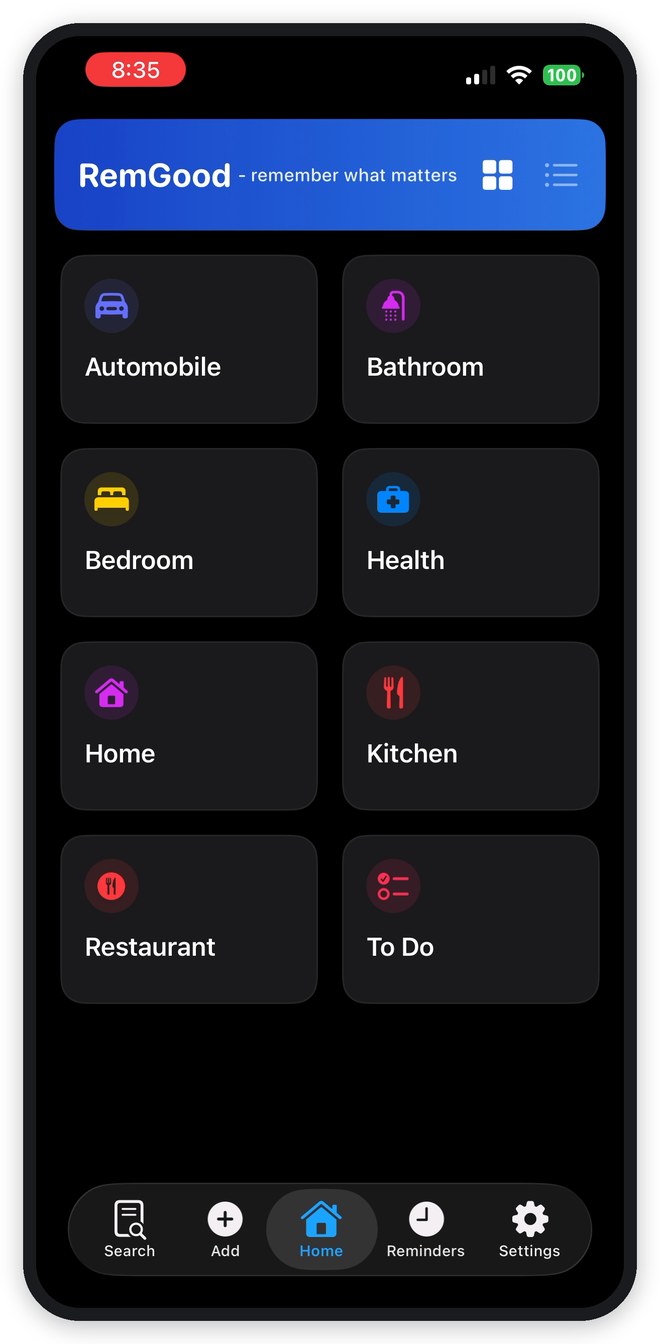
The Home tab opens on your categories — Automobile, Health, Kitchen, Restaurant, and any others you define. This matters more than it looks. Categorizing at capture time is what makes retrieval fast six months later, and picking from a grid takes a fraction of the effort of typing a tag. Categories can be dragged into the order you want, and the control in the header switches between grid and list layouts.
2Capture in Seconds
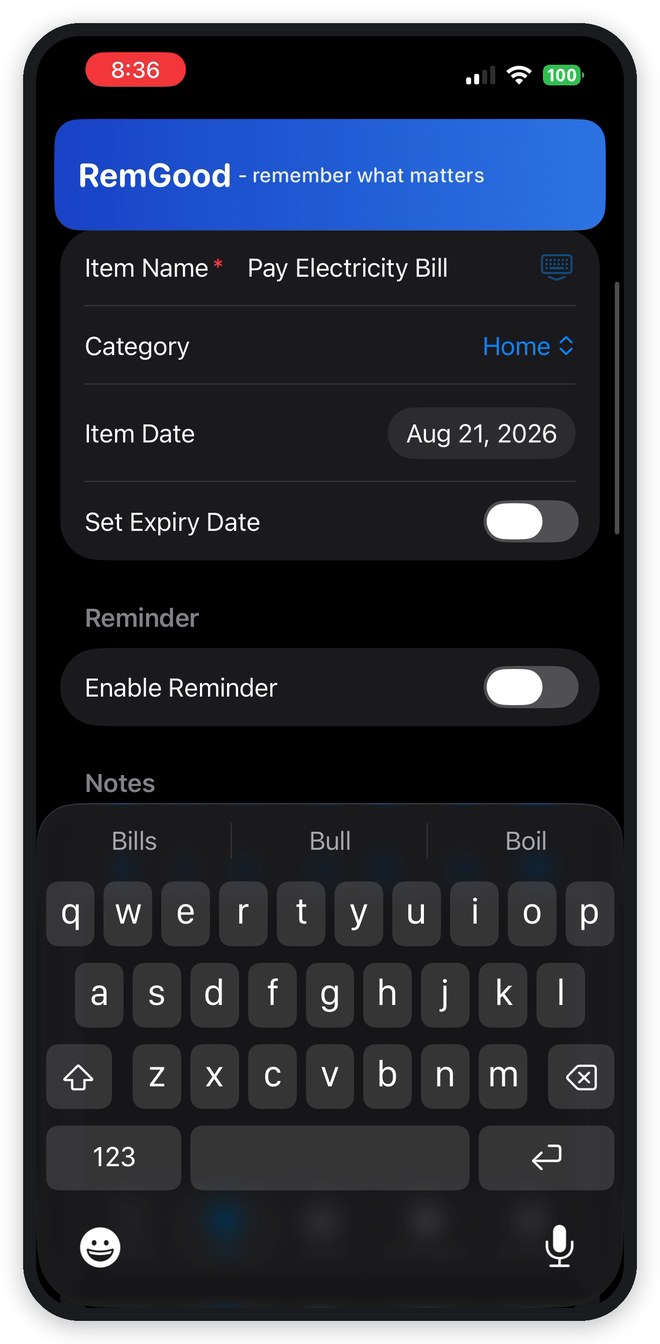
Adding an item is one screen. Name it, pick a category, set the date — and if it has a deadline, switch on an expiry. The category picker lists everything you’ve already created and lets you define a new one inline, so you never have to stop and design a taxonomy before recording a fact. Open Add from inside a category and that category is already selected for you.
3Reminders That Repeat On Their Own
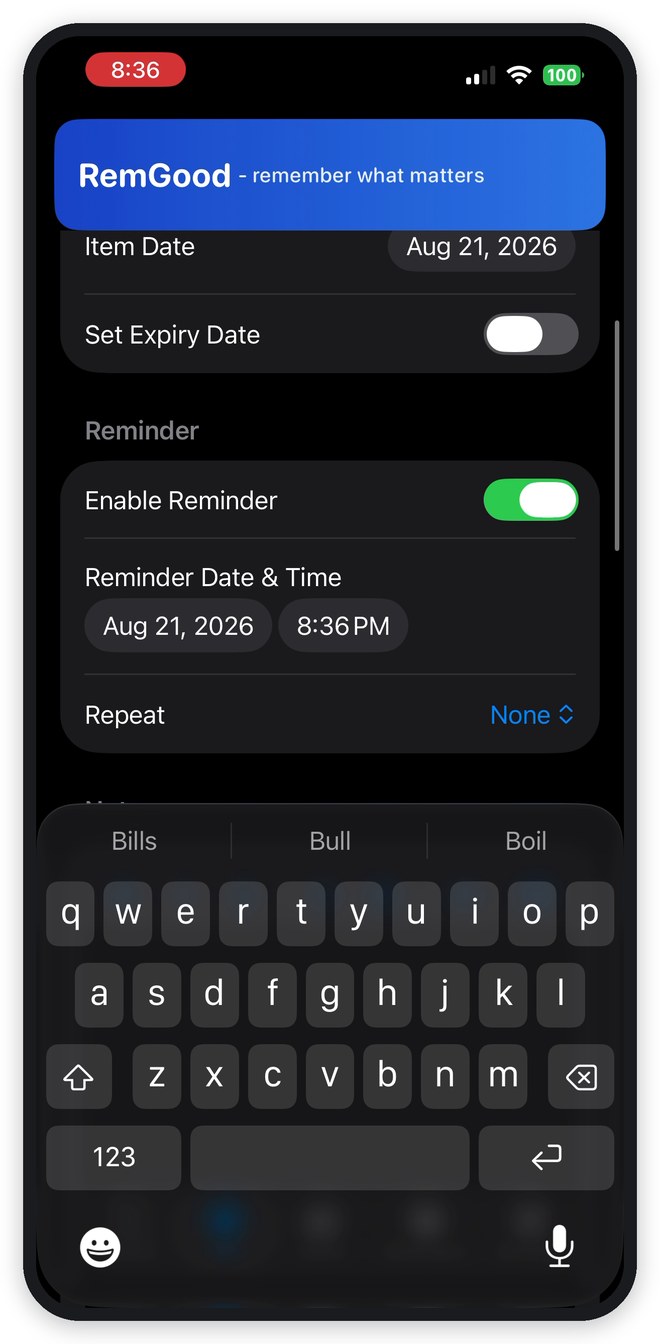
This is where the app earns its place. Switch a reminder on, set Next Reminder Date & Time to whatever you want, and RemGood leaves it there — editing the item’s other dates later will not move it. Add a repeat interval and recurring obligations regenerate themselves: daily, weekly, fortnightly, monthly, quarterly, half-yearly, yearly, or a custom number of days. A filter you replace every six months gets entered exactly once, and the field always shows the next occurrence still to come.
Every item with a reminder carries a small bell wherever it’s listed — grey while it’s still waiting. Notifications get missed — a phone on silent, a Focus overnight, a banner swiped away half asleep — so when a reminder comes due, that same bell turns orange and its category picks one up too, with a count on the app icon that stays right even if several reminders fire while the app is closed. They stay until you open the item and tap Acknowledge, which means the thing you missed at 1am is still waiting for you at breakfast.
4One View of What’s Actually Due
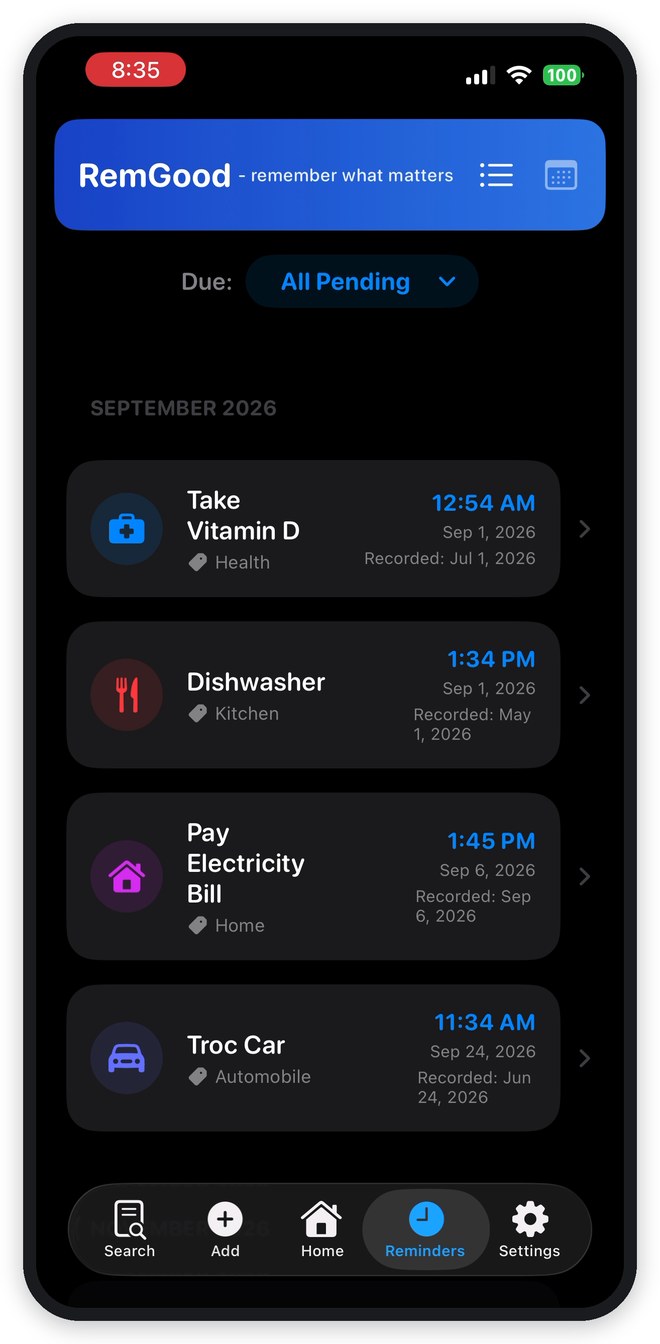
The Reminders tab answers a single question: what’s coming? Items are grouped by month in chronological order, each showing its time and category. The Due filter opens on All Pending — everything ahead of you — and narrows to Today, This Week, This Month, This Quarter, or This Year. A calendar layout is there for anyone who thinks spatially about time.
5Finding It Again, Months Later
Search runs across names, notes, and categories as you type, with filtering by category and sorting by priority, record date, reminder, or expiry. Each result carries its recorded date, next reminder, and repeat interval inline — usually enough to answer the question without opening anything. Attach a photo of the receipt or the model number when you create the item, and the detail is there when you’re standing in the hardware aisle.

6Privacy as a Feature, Not a Footnote
RemGood has no account system, no login, and no server. Every item, note, and attachment is stored locally using Apple’s SwiftData framework, inside the app’s sandboxed container. There’s nothing to breach because there’s nothing to transmit — reminders run entirely through the local notification system, with no push service involved, and there are no analytics SDKs or third-party trackers in the app. An optional App Lock gates it behind Face ID, Touch ID, or your passcode.
The tradeoff is deliberate and worth stating plainly: with no cloud, devices don’t sync. Export produces a single portable backup file, and that file is the migration path when you change phones.
7The Net Effect
None of these features is individually dramatic, and that’s the point. The productivity gain isn’t measured in tasks completed — it’s the removal of background cognitive load, the low-grade overhead of holding facts you can’t afford to lose but shouldn’t have to carry. Offloading them to something that resurfaces them at the right moment converts recurring mental work into a one-time entry. Capture once, get nudged correctly, stop rehearsing.
Common Questions
Is RemGood free? Is there a subscription?
It’s free, with no subscription, no in-app purchases, and no paid tier holding features back. There’s no account to create either — download it and start adding items.
Does it sync between my iPhone and iPad?
No, and that’s the direct cost of having no server. Each device keeps its own set of items. Moving between devices — or onto a new phone — is done with Export and Import, which produce a single backup file containing every item and attachment.
What happens to my data if I delete the app?
It goes with it. Because everything lives inside the app’s own container on your device and nothing is copied to a server, deleting RemGood deletes your items too. Export a backup first if you plan to reinstall, reset the phone, or upgrade.
Do reminders work without an internet connection?
Yes. Reminders are scheduled by iOS on the device itself rather than delivered from a push server, so they arrive on a plane, in a tunnel, or with the phone in airplane mode.
How is this different from the Reminders or Calendar app?
Those are built around events and tasks — things that happen at a time and are then done. RemGood is built around the durable fact behind the reminder: the model number, the receipt photo, the service history, the warranty length. The reminder is one field on that record rather than the whole of it, which is why an item stays useful long after its date has passed.
Can I store passwords or ID numbers in it?
Please don’t. RemGood is designed for everyday, non-critical details, and while your data stays on your device, backup files are compressed rather than encrypted. Driver’s license numbers, passport numbers, financial account details, and passwords belong in a password manager or Apple’s Keychain instead.
More detail in the user guide, or get in touch if your question isn’t here.
RemGood
Free for iPhone and iPad, requires iOS 17.6 or later.